
URL
Web URL
https://developer.mozilla.org/zh-CN/docs/Web/API/URL
https://zh.javascript.info/url
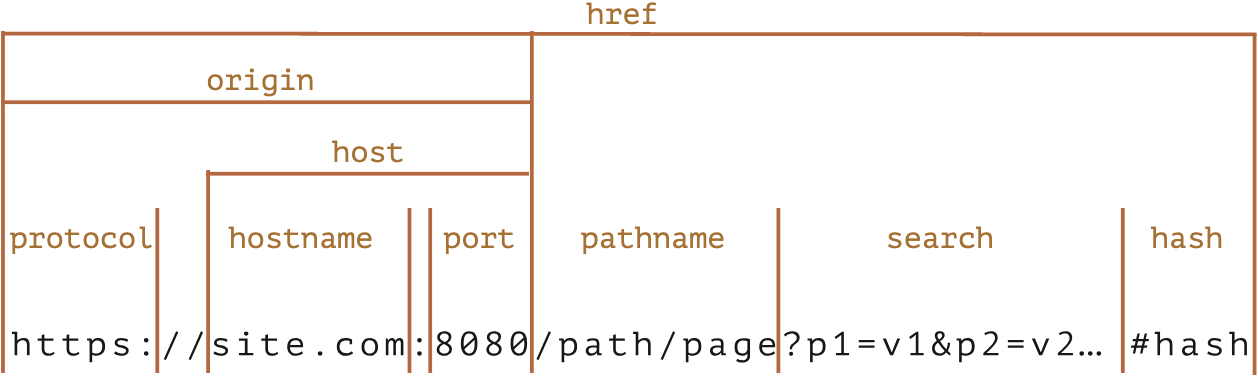
js
new URL(url, [base]);url 可以是完整的 URL ,也可以只是路径。
url 为路径,那么就需要在 base 中进行补齐。
base 可以是 string 也可以是 URL。
js
new URL("/user", "http://127.0.0.1:7001/api");

// http://127.0.0.1:7001/user

// api 无了!!!js
new URL("/profile/admin", "https://javascript.info");

// https://javascript.info/profile/adminjs
let url = new URL("https://javascript.info/profile/admin");

let newUrl = new URL("tester", url);
// https://javascript.info/profile/testerjs
let url = new URL("https://google.com/search");

url.searchParams.set("q", "test me!"); // 添加带有一个空格和一个 ! 的参数

alert(url); // https://google.com/search?q=test+me%21url.searchParams 是 URLSearchParams,会自动处理 空格、特殊符号等
URLSearchParams 类 Map, 提供如下 API:
https://developer.mozilla.org/zh-CN/docs/Web/API/URLSearchParams
- append(name, value) 添加参数
- delete(name) 移除参数
- get(name) 获取参数
- getAll(name) —— 获取相同 name 的所有参数(这是可行的,例如 ?user=John&user=Pete)
- has(name) —— 是否存在
- set(name, value) —— set/replace 参数
- sort() —— 按 name 对参数进行排序,很少使用
Object to SearchParams
js
Web encodeURI
https://developer.mozilla.org/zh-CN/docs/Web/JavaScript/Reference/Global_Objects/decodeURI
>>>
encodeURI 不会对 ? & 等字符处理
>>>
>>>
encodeURIComponent 所有都会处理
>>>