
微信小程序 获取 状态栏 与 标题栏
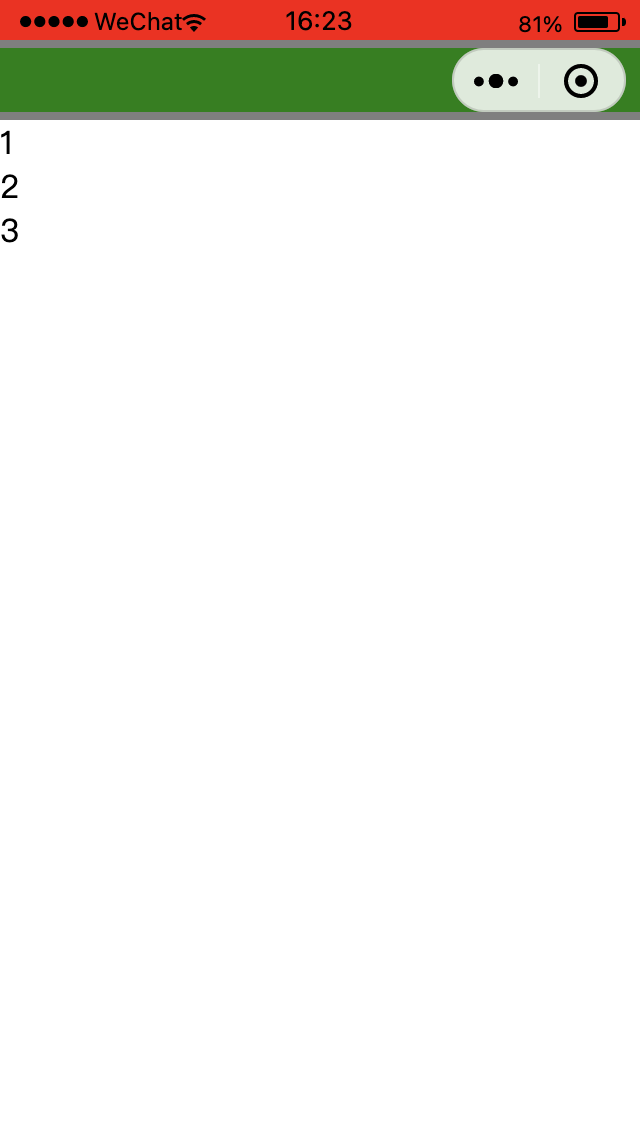
状态栏
通过 wx.getWindowInfo() 可以直接获取
https://developers.weixin.qq.com/miniprogram/dev/api/base/system/wx.getWindowInfo.html
js
const { statusBarHeight } = uni.getWindowInfo();使用实例:
vue
<template>
  <view :style="status"></view>
</template>

<script setup lang="ts">
import { ref, computed } from "vue";

const statusBar = ref(0);

const { statusBarHeight } = uni.getWindowInfo();

const status = computed(() => ({
  background: "red",
  height: statusBar.value + "px",
}));
</script>单位是 px
标题栏
微信小程序没有标题栏一说,只有 “菜单按钮”
并且 “菜单按钮” 与 状态栏存在一个间距
通过 wx.getMenuButtonBoundingClientRect() 可以获取 “菜单按钮” 的基本信息(如:高度)
https://developers.weixin.qq.com/miniprogram/dev/api/ui/menu/wx.getMenuButtonBoundingClientRect.html
通过计算可以得到 状态栏 与 菜单按钮 的间距,从而计算出那个所谓的标题栏
js
const { statusBarHeight } = uni.getWindowInfo();
const { height, top } = uni.getMenuButtonBoundingClientRect();

const statusBar = statusBarHeight;

const 间距 = top - statusBarHeight;

const 标题栏 = 间距 + height + 间距;具体使用看实际情况
uni 下的简单示例
vue
<template>
  <view class=" crete-org-layout">
    <view :style="status"></view>
    <view :style="gap"></view>
    <view :style="title"></view>
    <view :style="gap"></view>
    <view>1</view>
    <view>2</view>
    <view style="flex: 1"></view>
    <view>3</view>
  </view>
</template>

<script setup lang="ts">
import { ref, computed } from "vue";

const statusBar = ref(0);
const titleBar = ref(0);
const gapBar = ref(0);

const { statusBarHeight } = uni.getWindowInfo();
const { height, top } = uni.getMenuButtonBoundingClientRect();

statusBar.value = statusBarHeight;

gapBar.value = top - statusBarHeight;

titleBar.value = height;

const status = computed(() => ({
  background: "red",
  height: statusBar.value + "px",
}));

const gap = computed(() => ({
  background: "rgba(0, 0, 0, 0.5)",
  height: gapBar.value + "px",
}));
const title = computed(() => ({
  background: "green",
  height: titleBar.value + "px",
}));
</script>

<style scoped lang="scss">
.crete-org-layout {
  display: flex;
  flex-direction: column;
}
</style>