
DOM
Document Object Model
Live DOM Viewer:https://software.hixie.ch/utilities/js/live-dom-viewer/
Node / 节点
节点有 12 种:
// https://dom.spec.whatwg.org/#node
interface Node : EventTarget {
  const unsigned short ELEMENT_NODE = 1;
  const unsigned short ATTRIBUTE_NODE = 2;
  const unsigned short TEXT_NODE = 3;
  const unsigned short CDATA_SECTION_NODE = 4;
  const unsigned short ENTITY_REFERENCE_NODE = 5; // legacy
  const unsigned short ENTITY_NODE = 6; // legacy
  const unsigned short PROCESSING_INSTRUCTION_NODE = 7;
  const unsigned short COMMENT_NODE = 8;
  const unsigned short DOCUMENT_NODE = 9;
  const unsigned short DOCUMENT_TYPE_NODE = 10;
  const unsigned short DOCUMENT_FRAGMENT_NODE = 11;
  const unsigned short NOTATION_NODE = 12; // legacy
}元素节点:可以拥有子项。
文本节点:没有子项。
注释也是一种
空格 和 换行 在 文本节点 中是有效的,只是 body 会忽略掉。
Node 的内建类
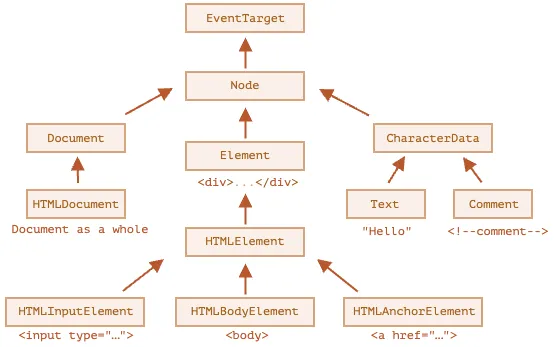
tagName 仅适用于 Element 节点
nodeName 任意 Node 都有
nodeValue 和 data 是非 Element 的属性。
document.body.nodeName; // 'BODY'
document.body.tagName; // 'BODY'more:https://html.spec.whatwg.org/#htmlinputelement
navigation property
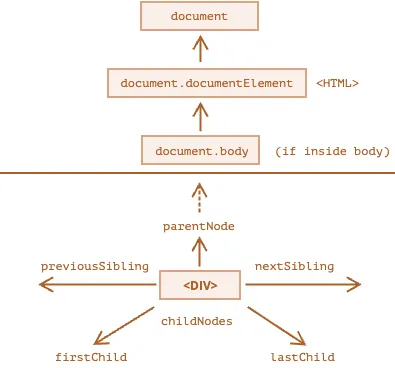
html = document.documentElement
head = document.head
body = document.body
document.body 的值可能是 null。因为 浏览器 可能还没有读到它。
childNodes:所有子节点firstChild:第一个lastChild:最后一个hasChildNodes:boolean
NodeList 是可迭代,不是 Array。 NodeList 的元素是可读的,不能修改。
find
document.getElementByIddocument.querySelectorAll(css) 通过 css 找document.querySelector(css) 只找一个element.matches(css) boolean ,是否存在 csselement.closest(css) 通过 css 在父 Node 种找
document.querySelectorAll("ul > li:last-child");常用 dom 属性
innerHTML 的特性是先移除,后重新添加
outerHTML 不会修改 DOM 元素 ,而是删除后插入新的 HTML
textContent 去掉标签的 innerHTML,纯文本
hidden 是否可见
attributes and properties
attributes 是 HTML 的
properties 是 DOM 的
- elem.hasAttribute(name) —— 检查特性是否存在。
- elem.getAttribute(name) —— 获取这个特性值。
- elem.setAttribute(name, value) —— 设置这个特性值。
- elem.removeAttribute(name) —— 移除这个特性。
data-开头是 attributes 为保留字段,用于 coder 使用
elem.getAttribute("data-xxxxxxx");也可以:
elem.dataset.xxxxxxx;DOM API
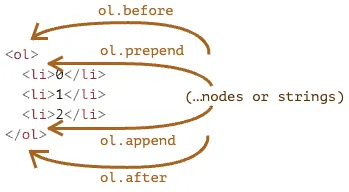
node.append 在 node 末尾 插入 节点或字符串
node.prepend 在 node 开头 插入
node.before 在 node 前面 插入
node.after 在 node 后面 插入
node.replaceWith 将 node 替换为给定的 值
这些 API 适用于 node,参数是 string 或者 node
所有插入方法都会自动从旧位置删除该节点。
<div id="first">First</div>
<div id="second">Second</div>
<script>
  // 无需调用 remove
  second.after(first); // 获取 #second,并在其后面插入 #first
</script>如果是 Element 插入 html,则用这个:
insertAdjacentHTML(where, html); // 将 HTML 插入
insertAdjacentText(where, txt); // 将 文本 插入
insertAdjacentElement(where, elem); // 将 元素 插入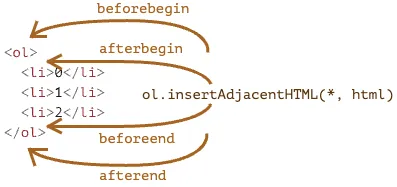 where 是一个字符串,具体值为:
"beforebegin" —— elem 之前
"afterbegin" —— elem 内第一个
"beforeend" —— elem 内最后一个
"afterend" —— elem 之后
移除节点:node.remove()
elem.cloneNode(true) 深度克隆 elem.cloneNode(false) 包括子元素
DocumentFragment:一种特殊 DOM,用来装 DOM,方面同意插入,类似 <></>
过时的:parentElem.appendChild、parentElem.insertBefore、parentElem.removeChild
document.write:在没有 DOM 时的 API,非常远古了!
css class 和 style
todo
DOM 的自动修正
不正确的 HTML,在形成 DOM 时,会自动更正它。
如:没有 html 和 body 会自动生成
some code
Point 需要回头在复习一下,然后独立出来。
class Point {
  constructor(x, y) {
    this.x = x;
    this.y = y;
  }
}

/**
 * parent 的几个限制,position非static、Table/Td/Th、body
 *
 * a   b
 *  ┏━┓
 *  ┗━┛
 * d   c
 *
 * all 不包括滚动条Width/Height
 */
export const getDOMLoactionInfo = (dom) => {
  if (!dom) return null;

  // 父类
  const parent = dom.offsetParent;

  const width = dom.offsetWidth;
  const height = dom.offsetHeight;

  const a = new Point(dom.offsetLeft, dom.offsetTop);
  const b = new Point(dom.offsetLeft + width, dom.offsetTop);
  const c = new Point(dom.offsetLeft + width, dom.offsetTop + height);
  const d = new Point(dom.offsetLeft, dom.offsetTop + height);

  const result = {
    parent,
    width,
    height,
    point: {
      leftTop: a,
      topRight: b,
      rightBottom: c,
      bottomRight: d,
      a,
      b,
      c,
      d,
    },
    borderAndScrollBar: {
      width: dom.clientLeft,
      height: dom.clientTop,
    },
    contentAndpadding: {
      width: dom.clientWidth,
      height: dom.clientHeight,
    },
    scroll: {
      hasScroll: {
        x: dom.scrollLeft,
        y: dom.scrollTop,
      },
    },
    all: {
      // 不包括 滚动条宽度
      width: dom.scrollWidth,
      height: dom.scrollHeight,
    },
  };

  return result;
};

/**
 * 这个 width/height 是浏览器 网页所占内容的。即不包括浏览器 title 那部分。
 *
 * 当 HTML 中没有 <!DOCTYPE HTML> 时,可能会出现一些稀奇古怪的情况。
 */
export const getDocumentInfo = () => {
  return {
    width: document.documentElement.clientWidth,
    height: document.documentElement.clientHeight,

    all: {
      width: Math.max(
        document.body.scrollWidth,
        document.documentElement.scrollWidth,
        document.body.offsetWidth,
        document.documentElement.offsetWidth,
        document.body.clientWidth,
        document.documentElement.clientWidth
      ),
      height: Math.max(
        document.body.scrollHeight,
        document.documentElement.scrollHeight,
        document.body.offsetHeight,
        document.documentElement.offsetHeight,
        document.body.clientHeight,
        document.documentElement.clientHeight
      ),
    },
  };
};

export const windowScroll = () => {
  // document.documentElement.scrollTop === window.pageYOffset
  return {
    x: window.scrollX,
    y: window.scrollY,
  };
};

export const stopScroll = () => {
  document.body.style.overflow = "hidden";
};

export const regainScroll = () => {
  document.body.style.overflow = "";
};

export const getPointOfWindow = (dom) => {
  const {
    x, // 矩形原点 对于窗口的 X/Y 坐标。可以为负
    y,

    width, // 矩形的 width
    height,
  } = dom.getBoundingClientRect();

  const a = new Point(x, y);
  const b = new Point(x + width, y);
  const c = new Point(x + width, y + height);
  const d = new Point(x, y + height);

  return {
    leftTop: a,
    topRight: b,
    rightBottom: c,
    bottomRight: d,
    a,
    b,
    c,
    d,
    width,
    height,
  };
};

/**
 * 嵌套最多(the most nested)的元素
 *
 * 可能为 Null
 */
export const getDomByWindowPoint = (x, y) => {
  return document.elementFromPoint(x, y);
};