
元素与位置
元素大小和滚动 https://zh.javascript.info/size-and-scroll
首先,要明白
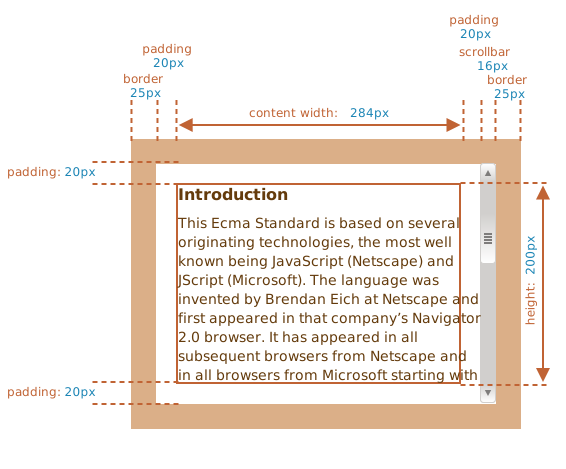
其次来学习
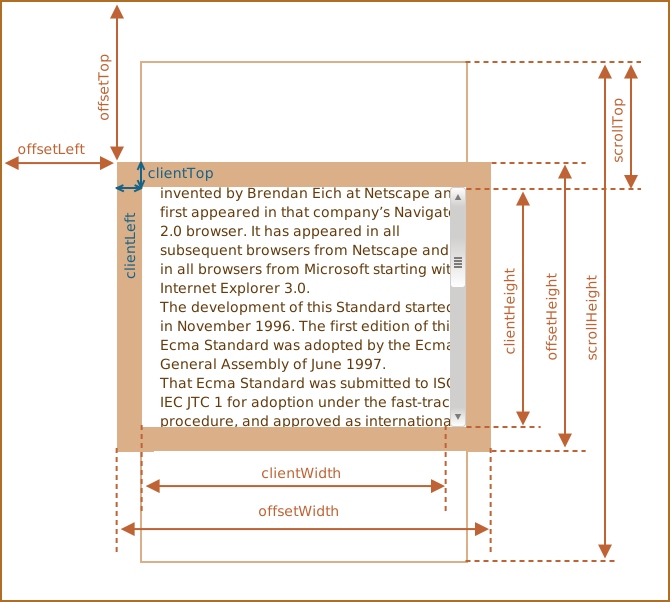
offsetLeft、offsetTop
offsetLeft 与 offsetTop 提供的是相对 offsetParent 的距离。
offsetParent 是
- CSS 定位(position 非 static)
- <td>,<th>,<table>
- <body>
offsetWidth、offsetHeight
offsetWidth 与 offsetHeight,完整大小(包括边框)。
注意
对于未显示的元素,其属性为 0/null。
clientTop、clientLeft
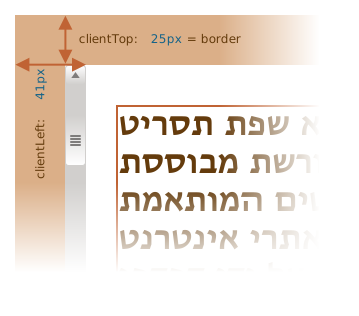
clientTop、clientLeft 大多时候可以用来获取 Border 宽度,但并不是所有:
clientWidth、clienHeight
包括 内容(content width)与 padding
不包括 滚动条宽度(scrollbar)
所以如果 padding 为 0,clientWidth 等于 content width
scrollWidth、scrollHeight
不包括滚动条
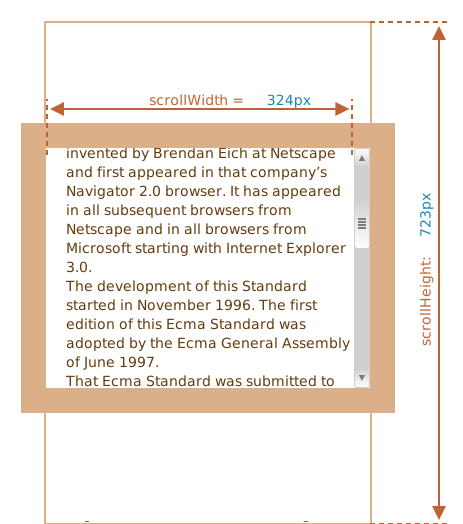
示例:todo 点击显示全部
scrollLeft、scrollTop
scrollLeft、scrollTop 是可以修改的。
scrollTop 就是 “已经滚动了多少”