
Vue
qrcode.vue
删除缓存
sh
rm -rf node_modules/.tmp node_modules/.vite长 list
vue virtual scroller
vue3 推荐 vueuse 的 useVirtualList
admin
- Soybean Admin https://docs.soybeanjs.cn/zh/
- Vben Admin
其他的一些参考:Pure Admin、
组件库
- 字节 acro https://arco.design/
- 腾讯 TDesign https://tdesign.tencent.com/
- 华为 DevUI https://vue-devui.github.io/
- 华为 OpenTiny Design of Vue https://opentiny.design/opentiny-design/guide/introduce
- Naive UI https://www.naiveui.com/zh-CN/os-theme
ts
import type {
  CSSProperties,
  InputTypeHTMLAttribute, // input type
} from "vue";ts
import { reactive } from "vue";
const props = defineProps<{}>();
const emit = defineEmits([]);name
在 3.2.34 或以上的版本中,使用 <script setup> 的单文件组件会自动根据文件名生成对应的 name 选项,无需再手动声明。
define / 宏
ts
// (Vue 3.3+)
defineOptions({
  inheritAttrs: false,
  name: "MyComponent",
});inheritAttrs: false 关闭默认的继承,让其不直接打在根元素上,让开发者可以自己处理。尤其是配合 $attrs 处理时。
defineExpose 未接受的,都将进入 $attrs
ts
// 定义 expose(Vue 3.3+)
defineExpose({
  focus: () => input.value?.focus(),
});useTemplateRef
useTemplateRef
https://cn.vuejs.org/api/composition-api-helpers.html#usetemplateref
vue
<script setup>
import { useTemplateRef, onMounted } from "vue";

const inputRef = useTemplateRef("input");

onMounted(() => {
  inputRef.value.focus();
});
</script>

<template>
  <input ref="input" />
</template>props
https://cn.vuejs.org/api/sfc-script-setup.html#default-props-values-when-using-type-declaration
ts
interface Props {
  msg?: string;
  labels?: string[];
}

const props = withDefaults(defineProps<Props>(), {
  msg: "hello",
  labels: () => ["one", "two"],
});Vue 生命周期
api:https://cn.vuejs.org/api/composition-api-lifecycle.html
js
function onMounted(callback: () => void): void;

function onUpdated(callback: () => void): void;

onUnmounted

// KeepAlive 相关
onActivated
onDeactivated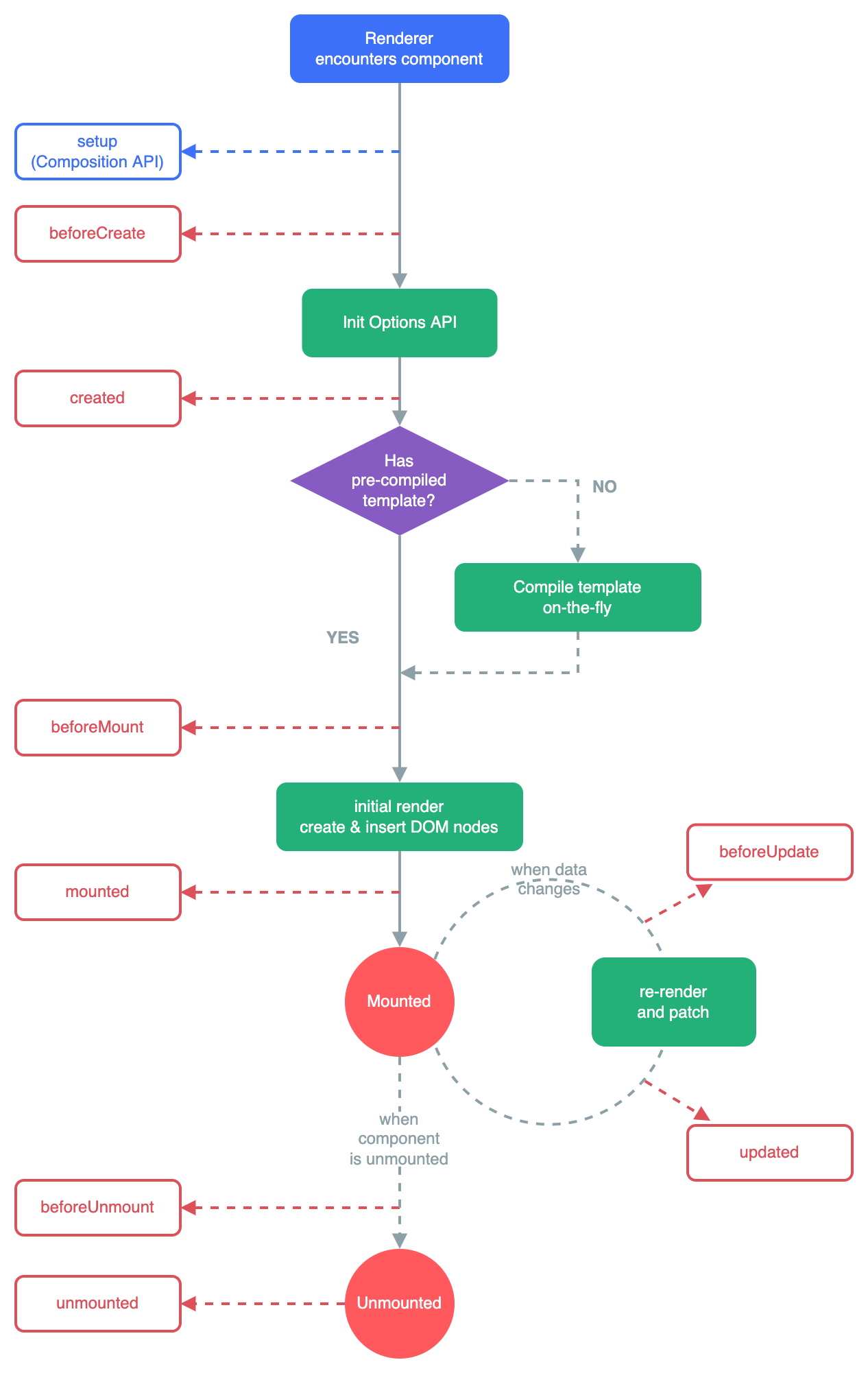
pinia getters 使用 this 访问其他 getters 类型推断错误
ts
export const useSwimOrderStore = defineStore('swimOrder', {
  getters: {
    tickets: (state) => [...state.list.ticket, ...state.list.card],
    //
    orderUseTicket(): ISwimTicket | undefined {
      const { mid } = this.order

      return this.tickets.find(({ id }) => id === mid)
    }
  }
}全局 Dialog
ts
import { h, render } from "vue";
import { Dialog } from "tdesign-mobile-vue";
export const showDialog = (props: any = {}) => {
  const container = document.createElement("div");

  // 1 创建vNode
  const vm = h(Dialog, props);
  // 2 render
  render(vm, container);
  // 3 append body
  document.body.appendChild(container);

  return {
    remove() {
      render(null, container);
      document.body.removeChild(container);
    },
  };
};使用:
ts
await new Promise((resolve, reject) => {
  const visible = ref(true);
  const props = {
    visible,
    content: "您还未登陆,是否前去登陆?",
    cancelBtn: "不登陆",
    confirmBtn: "去登陆",
    onConfirm: () => {
      visible.value = false;
      setTimeout(remove, 1000);
      resolve(true);
    },
    onCancel: () => {
      visible.value = false;
      setTimeout(remove, 1000);
      reject(false);
    },
  };
  const { remove } = showDialog(props);
});动态反馈 dom 的宽高
ts
export const useWatchDomWidthHeight = (name: string) => {
  const width = ref<number>(0);
  const height = ref<number>(0);
  const dom = useTemplateRef<HTMLDivElement>(name);

  const observer = new ResizeObserver((entries: ResizeObserverEntry[]) => {
    // https://developer.mozilla.org/zh-CN/docs/Web/API/ResizeObserverEntry
    const [{ contentRect }] = entries;

    width.value = contentRect.width;
    height.value = contentRect.height;
  });

  const init = () => {
    if (!dom || !dom.value) {
      nextTick(init);
      return;
    }
    // 监听 dom 的宽高变化
    observer.observe(dom.value);
  };

  onMounted(init);

  onUnmounted(() => {
    observer.disconnect();
  });

  return { width, height };
};